
Appearance
Badges
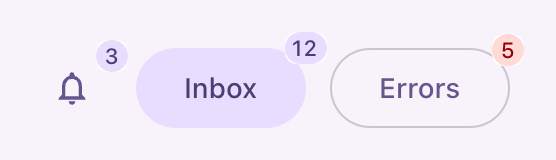
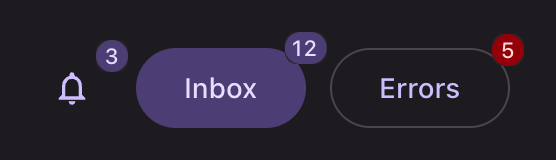
Filament has one badge where Material has two. Standing on its own, in a table cell, a filter indicator or a selected value, it is a chip: 32dp tall, rounded 8dp, label-large. Attached to another control it is a badge: a fully rounded pill of at most two digits.
Default variant: filled, on the secondary container unless a color says otherwise.
Attached
php
use Filament\Actions\Action;
use Filament\Support\Icons\Heroicon;

Action::make('notifications')->icon(Heroicon::OutlinedBell)->iconButton()->badge(3);
Action::make('inbox')->label('Inbox')->tonal()->badge(12);
Action::make('errors')->label('Errors')->outlined()->badge(5)->badgeColor('danger');
Applies on an icon button, a button, a link, a tab and a sidebar item. Anywhere else it renders in the standalone form below.
Variants
| Variant | Material name | Modifier | Container |
|---|---|---|---|
| Filled | Filled chip | none, or ->filledBadge() | The color's container role |
| Outlined | Outlined chip | ->outlinedBadge() | Transparent, behind a 1dp outline |
| Elevated | Elevated chip | ->elevatedBadge() | The filled container, at elevation 1 |
Filled


php
use Filament\Tables\Columns\TextColumn;

TextColumn::make('status')->badge();
TextColumn::make('status')->badge()->color('success');
Outlined


php
TextColumn::make('status')->badge()->outlinedBadge();Elevated


php
TextColumn::make('status')->badge()->elevatedBadge();variant() takes the same set by name:
php
use Saade\FilamentMaterialTheme\Enums\ChipVariant;

TextColumn::make('status')->badge()->variant(ChipVariant::Outlined);
TextColumn::make('status')->badge()->variant('outlined');| Case | Value |
|---|---|
ChipVariant::Filled | filled |
ChipVariant::Outlined | outlined |
ChipVariant::Elevated | elevated |
On an entry
The same methods are on infolist entries:
php
use Filament\Infolists\Components\TextEntry;

TextEntry::make('status')->badge()->outlinedBadge();
A variant is set on the column or the entry, not on a badge, because Filament builds its badge markup as a fixed string. It therefore applies to every badge that cell or entry renders.
Where a badge is drawn differently
| Place | Shape |
|---|---|
| A tags input tag | Secondary container, rounded 8dp |
| A select value, or a table select's | Surface-container-low behind a hairline |
| A filter indicator | The chip shape, with its label in label-large on the variant ink |
API
| Method | On | Result |
|---|---|---|
filledBadge() | Column, Entry | Filled |
outlinedBadge() | Column, Entry | Outlined |
elevatedBadge() | Column, Entry | Elevated |
variant(ChipVariant|string) | Column, Entry | Any of the above by name |
Registered on Filament\Tables\Columns\Column and Filament\Infolists\Components\Entry, so every column and entry type takes them. The class is written to the table cell or the entry wrapper, and merges rather than replaces.
Why the names end in Badge
An Entry descends from the schema component that carries the card variants, so a bare outlined() on one would give an outlined card.